Showing posts with label Review. Show all posts

Monday, June 15, 2015

Gear Review: Sony MDR-ZX770BN - Bluetooth and Noise Cancellation?!

...a brief pause from Norway...

About four months ago, I picked up a pair of SOL Republic Tracks Air. They were a good set for around the city, as I discussed here, but on the plane they came up a bit short. I've been using them a lot a work and I've been happy with them for the most part, but the lack of noise cancellation on the plane has sent me looking for another option. I want the convenience of a bluetooth headset combined with the noise cancellation needed for travel. Oh, and I don't want to spend three hundred dollars.
 
In reality, there are very few options in this space. Most bluetooth headsets don't have noise cancellation. Most noise cancellation headsets aren't wireless. The few that have both end up being $250, plus. Enter the poorly named Sony MDR-ZX770BN*. Bluetooth? Check. Noise cancellation? Check. Price? $189 at Costco (for the deluxe package with the carrying case).


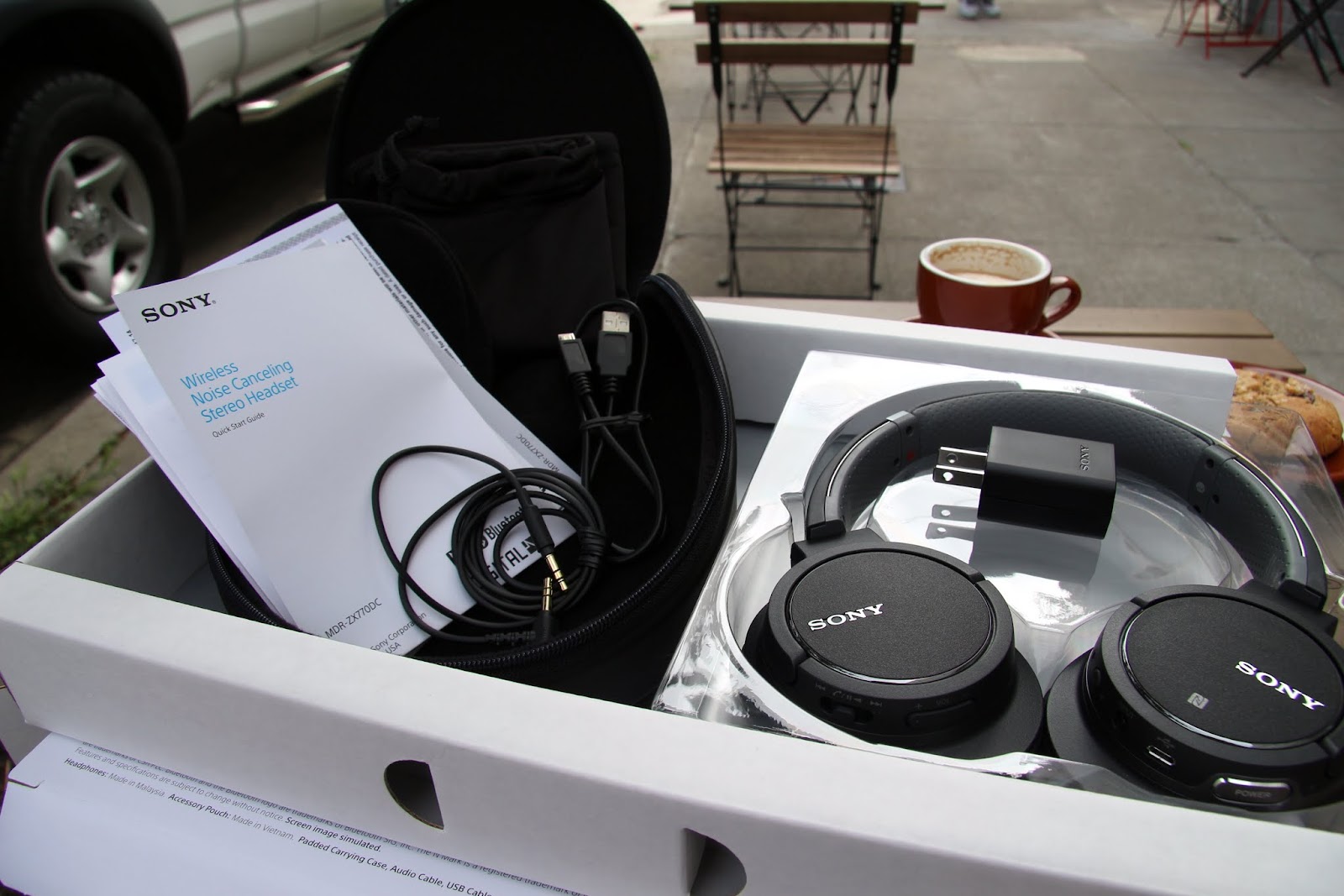
Popping the packaging open we have the headset themselves and the carrying case. The carrying case has the rest of the accessories inside it, including a solid USB charger, USB Micro B cable, a wired input cable (more on that later), and mini case for your accessories. Everything fits comfortably in the case seen above. One important note is that these are over the ear, not on the year. In my experience, this is far more comfortable (although they do get warm with extended use).


The wired input cable above is one of the nice features that immediately pops out at me. The input is only on one side of the headset, which means that there is only one cable to deal with. One side goes into the left earpiece and the other plugs into a standard 3.5mm jack. The Tracks Air that I also have also has a similar cable, but requires one plug per ear. It's a small annoyance, but once you get used to no cables, it feels like a mess.

On the left earpiece (above), you can see from left to right the reset hole, mic, noise cancellation button, the connection for the wired input cable, the charging port, and the silver power button. Pressing the NC button turns on or off the noise cancellation, while a long press triggers an optimization process. Sony claims that they have three different profiles of noise cancellation tailored for different environments. The optimization take a couple seconds and tries to select the best profile for noise cancellation.The real test of the noise cancellation will be on my next flight, so I'll follow up with the final verdict then.


The other has controls for music and calling. The headset does double as a bluetooth headset if needed. Flicking the controls up advances the track, while flicking it down does back. The volume buttons feel solid (as done the rest of the construction), but the rocker is my bet for the weak link. We'll see if it goes out in a year or two or never.

Soundwise, solid. They don't feel as heavily tweaked towards the bass as the SOL Republic set does, but the soundstage is larger and it is clear enough for me. The noise cancellation helps even more. If there is any loss of quality other the bluetooth, I don't think I could tell you that level of difference for what I am playing. I tend to listen to high quality Spotify and for that these perform well. The loss in quality -if there- is slight to none. These also come with aptX support, if that is a thing that you have and care about. My phone does not support it. Consider me a happy customer.


*Seriously. What's the difference between The MDR-ZX770BN, ZX770BT, and ZX770DC? BN is bluetooth and noise cancellation, BT is just bluetooth (and $100 less), while DC is the code specifically for Costco (which includes the BN version of the headset with accessories). Add to that the ZX750 series and you have a bunch of research that Sony is expecting the consumer to do.

Monday, May 11, 2015

SOL Republic In-flight Testing

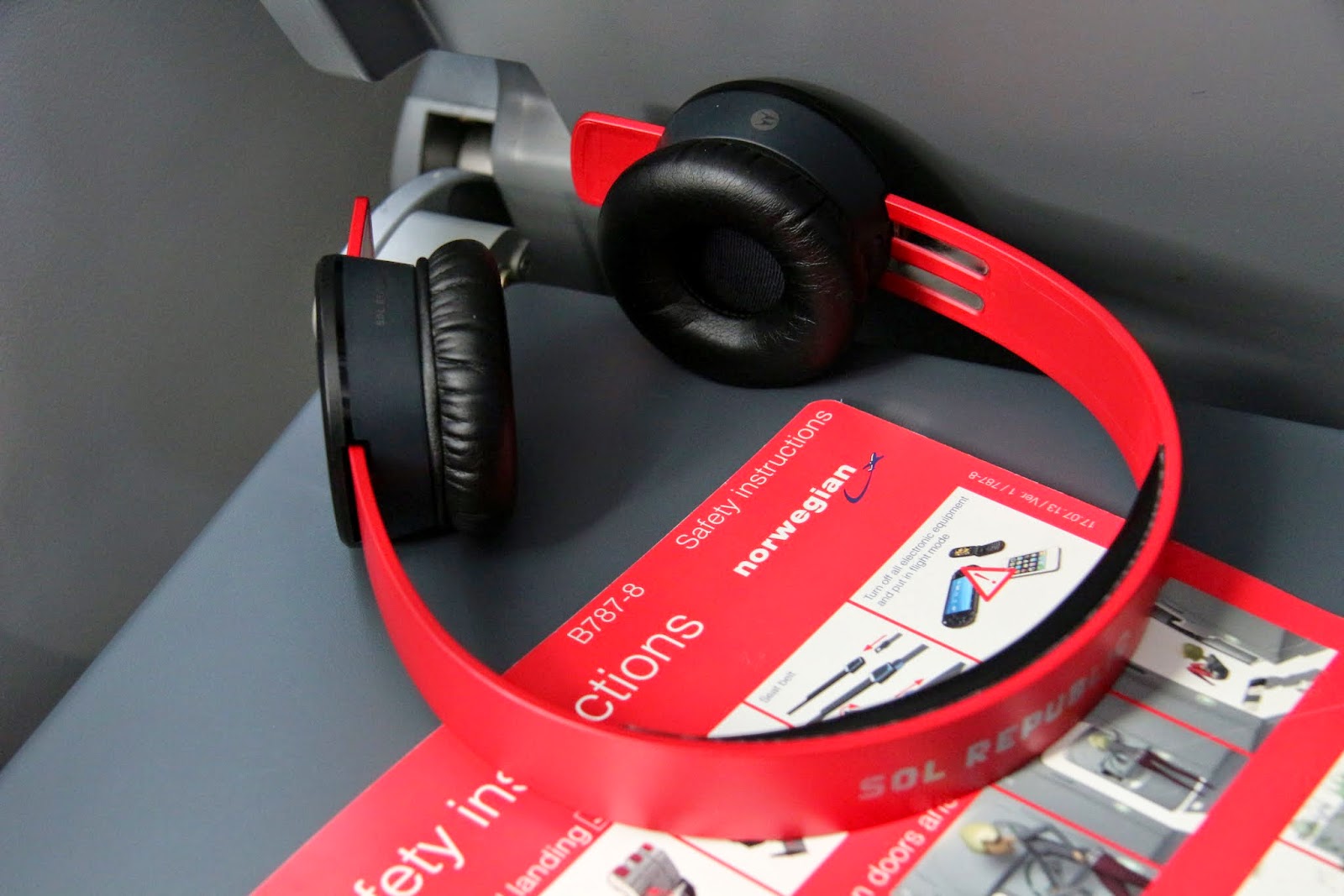
During my crazy month of April, I finally had the opportunity to try out my SOL Republic Bluetooth headphones on a plane. Naturally, performance here is going to be a big deal for me. The wireless features are great (as I first reported here), but planes offer a much different environment than around town.

So, how did they do?


Unfortunately, not that great. They did exactly what they were supposed to do (working both wirelessly and with the corded option perfectly), but the noise found in the Norwegian 787 was just too much for these otherwise good headphones. After being spoiled with active noise cancellation, I don't think I can ever fully go back. On the other hand, after being exposed to the freedom that comes with bluetooth wireless (again, first raved about here), I don't think that I can go back to a wired headset either.

While I'm still using these day to day, I am now going to have to find a pair that brings in the trifecta: Bluetooth, quality sound, and active noise cancellation. We'll see what I find!

Thursday, January 29, 2015

SOL Republic Tracks Air Headphone Review

I've been searching for a new pair of headphones for awhile. I used to use in-ear headphones, but they always seemed to break, so for the past few months I've been trying to find a good pair of traditional over-the-head headphones. In addition to my trusty Sony NC40s from 2008 (noise cancellation for flights), I recently picked up a Sony ZX set, an AmazonBasics pair, and now a set of SOL Republic Tracks Air. Since these are a bit pricey ($149-ish retail now), I thought I'd give you a review.


Short story: man, these things are nifty. I never knew cutting the cords would be quite this nice. Once upon a time, I worked at a place that sold wireless headphones that had a stand and connected by either infrared beams or low powered analog radio. They sucked. Static, finicky, expensive, and bad battery life. Thankfully, technology today is much different.

These headphones are bluetooth enabled, which means that your music streams wirelessly to the headphones from just about any modern phone or laptop. It's baked in to every smartphone and Connecting the headphones to my laptop was a snap, but even more impressive was setting up the connection on my mobile phone. All I had to do was tap the phone to the right earpiece where the NFC tag is and it just connected. Bluetooth turned on and a moment later, "Connected to TRACKS Air" appears on my screen.

Very slick.


All of the controls are on the right earpiece. Power, volume, and a multifunction button that lets you play/pause/skip tracks. You can also use the headphones as a headset as well: There are microphones built in to either side. The sound quality is pretty good with the microphones. My tests on Skype and on the phone came across clear. If you are a bluetoothless Luddite, the headphones also come with a a set of wires that will let you plug it into a a 3.5mm jack... but if that is your MO, then you can probably save some cash by foregoing all the bluetooth toys and buying a wired set like this.

Another concern you might have is play time, but fear not: A full charge gives up to 13 hours, so you only need to plug them in every other day or so with moderate use. The headphones charge over a standard micro-USB cable. Easy-peasy.


All those toys are nice (very nice), but what about the sound? After all, a wireless pair of headphones that suck still suck. I've been using these things a lot with Spotify at work, and overall I'm very happy with them. On a heavy day, I'll run through a couple hours of music, across a number of different genres.

For modern dance/electronica/trance, these things are great. Avicii, CAZZETTE, Pitbull, Robyn, Empire of the Sun, Deadmau5 (especially Deadmau5) and the like all get a wink and a nod from the engineers. The bass hits nicely and the vocals are clear. Something a little more... northwesty? No problem. Mary Lambert, Deathcab for Cutie, Macklemore, Postal Service, and even Sir Mix all sound great. The 808 kick drum makes people get dumb loud and clear. Luda comes in crisp and clear. Ne-Yo, Junip, Jonsi, alt-J, Two Door Cinema Club, Mumford & Sons, all sound good to me. These are designed and marketed towards a younger audience, so there is a little gaming with the sound going on to make them sound better with what is popular in the 20-30s crowd.

Where I did run into a little trouble came when I was running through my classic Big Band tracks. If there is an album that I have listened to ad nauseam, it is Ella Fitzgerald's Love Songs: Best of the Verve Songbooks. I was my first exposure to Ella and for awhile I listened to it pretty much non-stop. The net result is that even years after retiring the album from my main rotation, I still remember every single word and phrasing on the CD. The boomy profile of the headphones wasn't too well suited to the Big Band sound. Rich bass is good, but I am listening to as I type this "All the Things You Are", and I feel like the bass is getting in the way of some of the other components of the band. The brass isn't as bright I would like be. Listening to some Nate King Cole, it seems like Big Band isn't the best suited for the headset. The sound seems to be better paired to jazz trios, like much of Stan Getz and Carmen McRea.


Overall, the headphones worked well and despite a bump with a specific genre, I really like them. They are a solid performing headset, comfortable for longer periods, pretty sound isolating, and full of tech driven tricks. My next flight is in a couple weeks, so I'll write a follow up after that when I know how well they handle the noisy cabin while inflight and compare them to my active noise cancellation headphones.


Wednesday, November 20, 2013

Product Review: Clever Travel Companion Underwear with Hidden Pockets

About a month ago, I found out about a company called Clever Travel Companion. They offer a variety of "pick pocket proof" clothing that is geared towards the avid traveler. Pick pockets are usually one of the top fears for travelers and some of the other options out there, like the undershirt neck pouch, can be a bit of a hassle. This seems like it would be a good mix and I am all about supporting small companies when I can. The fact that the people running it are original from Sweden as far as I can tell also doesn't hurt...


Overview

I ended up with a pair of the men's and a pair of the women's for my girlfriend. The underwear features a button fly and two pockets on either side. The pockets are large enough to be useful (for example, they fit passports perfectly), but not too large as to get in the way of anything. The fabric feels pretty good and would be durable on a longer trip.

The Good Stuff & Around Town

To try them out, I loaded up the pockets and headed out on a trip to Victoria, BC via Kenmore Air. If they were going to end up being uncomfortable, a quick flight on a seaplane and walking around with a backpack would probably do the trick. After a half of walking around with the backpack and a full day of running around Victoria, I am happy to say that overall they remained comfortable without the zipper pulls poking anywhere or the pockets clumping awkwardly (as I had feared might happen). Retrieving items from a pocket was slightly tricky, but these are security pockets. In real life, you would excuse yourself to a restroom and then get what you need out of your, yes, pick pocket proof underwear pocket.

I also have it on good authority that the women's version is equally comfortable, although I don't have direct experience with that... The purple color is a nice and the pockets are the same size as the men's. 

The Feedback

The only complaint that I had was the fit was a little bit off. It wasn't enough to make them uncomfortable, but it does feel like they could be made to be a little more snug around the waist with a little extra tailoring. On the other hand, it is equally possible that sizing down one size may have addressed my issue.


Final Say

As I mentioned, my issue may be simply that I got the wrong size. If the waist band was a little tighter, it would have been a comfortable and functional for keeping important documents safe and sound. The thicker cotton is soft and remains comfortable throughout the day. Not bad! And it's just in time for the holiday season, if you're trying to find something to give the avid traveler in your life...

Thursday, November 17, 2011

Gear: Kindle Fire

The Kindle Fire has been hyped as a true competitor for the iPad and a game changer with it's $199 price tag and bevy of features. I recently got my hands on one and in this post, we'll be exploring Amazon's first tablet and color Kindle. After the break, we'll take a look at what the Kindle Fire is great at and whether this deserves a place in your gadget line up.


Wednesday, November 16, 2011

Gear: Kindle Touch 3G

As a frequent traveler, my Kindle Keyboard (as it's now known) has been a constant companion. It's been from Seattle to Stockholm, and Abu Dhabi to Athens. Everywhere I've gone, it's been my e-reader and my backup communicator so when Amazon announced their new Kindles, I had to get my hands on one for a review. After the break, we'll take an in-depth look at the Kindle Touch 3G (with Special Offers) and see if it lives up to it's older brother.


Tuesday, February 15, 2011

Gear: The Amazon Kindle (3rd Gen) WiFi + 3G

This past December, I decided to jump on the eReader bandwagon. The reason was simple: I was going to be reading a lot of articles in PDF over the next half a year and I didn't want to waste paper and money printing them out or run out of battery while reading on my laptop screen. After a review of the other readers on the market, like the B&N Nook and the Sony reader, I decided to go with the flagship Kindle 3 with Wifi and 3G.

UPDATE: The new Kindles are here. Check out my reviews of the Kindle Touch and Kindle Fire!


Was it worth it? Yep. It does the job, adds some extra features above and beyond just reading books, and did I mention free 3G worldwide? It does that, too.  Here's the basics:

Size and Feel: Extremely compact. This thing is like carrying around half a magazine, but with as much reading as you could possibly need. There's 4GB built into the device (not expandable), and that's plenty for thousands of books. The device itself feels nice and sturdy, with easy navigation via the side buttons. While it fits in the hand, I decided to opt for the official leather case and it feel very high quality with that on it (which apparently now only comes in the lighted version. If I had known that the light case actually draws power from the kindle itself, I might have opted for the extra $20 for it). With the case, it feels like holding a nice book or Moleskin journal. Update: After 8 months of use, the Kindle is still going strong. Some of the letters on the keys have been worn partially away, but otherwise it's been hassle free and looks as good as when I got it.


Screen: The screen is a 600x800 black and white E-Ink display. It honestly looks and reads like paper, which means it is easy on the eyes (literally). Even after hours of reading, you don't experience eye fatigue like many people do with LCD screens. The screen is responsive, but don't expect slick animations or anything fancy here. The screen speed is just fine for books, where you only have to change the screen every page or while navigating the system, but you will never watch a movie on here. Another major benefit is that there is no such thing as glare with this screen or issues with reading in the sun. If you can read paper, you can read the screen (as seen below).


Interface and Performance: It's really strange not having a touch interface. You expect to be able to touch the screen at first, but it's just not the case. Navigation is simple, and grouping of books is straightforward if a little laborious. There's a dictionary built in, and support for highlighting of passages (which stores that text in a new file for use later on) which is GREAT for references. The only disadvantage is that the concept of a "page" is blurred so referencing them is a little different. In fact, I don't know the proper way to reference a kindle book and according to my e-mail exchange with Purdue no one really does.


The three main navigation keys are "Home", "Menu", and "Back". They're pretty self-explanatory and work like you would expect them to. Pressing left on the five-way pad will offer to delete books. Pressing right will let you see details and group books into "collections". It's a very simple interface, but underneath it all is linux so future firmware releases could dramatically expand what the device can do. If you want see what else is under the hood, I recommend taking a look at the teardown of it over at EEVBlog.

In the realm of performance, the Kindle 3G has one major thing going for it: Battery life. It's not a blazing fast machine (but it is fast enough). It's not meant to stream full HD movies to your TV or run Starcraft II. It's meant to make reading easy, and that it does without complaint for what seems forever. I charge my kindle about once a week with heavy use and 3G on. If I were to turn 3G off and didn't use it every day, battery life would be measured in weeks.

Shop and Getting Books: Since I've got the 3G version, I can get books anywhere and anytime. I just load up the Amazon store, search for the book I want and hit buy. It shows up on the kindle within a minute.


It really is that easy. People with the wifi version can do the same, but only if they have an active wifi connection. That said, I highly recommend the full 3G version (or the slightly cheaper 3G with special offers. It's $50 less, but has "sponsored screensavers" and "special offers") over the wifi versions. The extra money is well spent for something that works everywhere, virtually without question, for free.

For PDFs and other eBook formats, there are a few more hoops to jump through, but nothing too drastic. Adding PDFs can be done via USB (it's a standard USB cable), by dragging and dropping the PDF into the documents folder on the device. PDFs are supported, but they are rather clunky to navigate, so I usually use the other option for getting material on to it: I send it to my kindle via email.

This is perhaps my second favorite feature, although to do it for free requires a wifi connection. By sending your documents to [you]@free.kindle.com with "convert" in the subject line, Amazon will convert your PDF files to their format and then send them to your kindle directly (no cable) when you log on to a wifi connection. All the clunkinessPDF that you need to read by the end of the day... The whole process to send, convert, and deliver to your Kindle takes about 5 minutes. If you don't want to have to find a hotspot, you can also send the documents to [you]@kindle.com with nothing in the subject and they will be delivered over 3G but it costs a little bit ($0.99/Mb with a $0.99 minimum) to use the 3G connection that way. Overall, I'm extremely happy with this method of getting stuff. You can do it from any computer with the popular document types and it makes reading them much easier than trying to do it in the original formats. I've barely needed to plug the USB cable in.

Where this method does choke up a bit is when PDFs have images or columns. It's still readable, but the formatting has been removed, so sometimes it shows up strangely.

Extra Features: Besides the ability to read books and documents, there are a few other tricks up the Kindle's sleeve. The first is the built in dictionary. If you ever need a definition, you simply move the cursor to the word and it pops up at the bottom of the screen with it instantly. Convenient and unobtrusive. The dictionary is also all there, if you would like to read it A to Z. Next, there is an extremely limited MP3 player built in, which isn't that exciting, but the real gem for the audio features on the kindle is the ability to read texts out loud. The speech is a little faster than I would like, but it sounds fairly natural and is a free option for when you don't want to read yourself. You can also post quotes from the book you're reading to your facebook and twitter, without leaving the book. It's just a baked in feature. Speaking of quoting, one killer use for the kindle is for references and quoting. When you highlight text, you can create a snippet which is stored as a text file and you can write notes to go along with the snippets. Plus, everything on the Kindle is searchable. Just type in what you're looking for, and it'll find that word or phrase wherever it appears in any of your documents. This is an excellent feature if you're in school and trying to study or need to take notes!

While all those are nifty features, the killer feature of the Kindle 3G, besides the screen itself, is the 3G connection. The Kindle has free 3G wireless service just about everywhere you're likely to end up. It sounds hard to believe, but it's true: I've used data service in the USA, England, Germany, the United Arab Emirates, Greece, Turkey and Sweden and in all cases it happily hums along without ever sending me a bill. Looking at the coverage map, we're basically talking anywhere you're likely to go, except central Asia and large parts of Africa. At first, this might sound like a whoop-de-doo feature ("Great, now I paid Amazon to be able to sell me books via 3G! What's so great about that?"), but there is a built in "experimental" browser which means your Kindle is effectively a copy of the Hitchhiker's Guide to the Galaxy. In addition to being able to use the browser to access most of the web (no flash or overly complicated pages), Wikipedia is also baked in, meaning you can access it anywhere and anytime you need it. Say you need to know about United Airlines....


There you go!

Of course, as mentioned you can also access the web with your built in browser. The combination of near universal 3G and internet makes your Kindle 3G the ultimate backup communication tool.

Did your battery on your phone die, but you need to send a message because your flight was delayed? No problem. Log in to Google Voice on your kindle and send them a text message, anywhere in the world.

In Greece but don't speak Greek but need to speak Greek? No Problem. Head over to kindlefish.com (by yours truly) on your kindle, type in what you need to say, hit a button, and get it back from Google Translate in Greek. Instantly.


Forget to send an important email before you left for your Hawaiian vacation, but you just got to the beach? No problem. Sit back, log in to your e-mail, and send it without spending half the day hunting down an internet cafe or having to go back to the hotel.

Just need a fix of my blog? No problem. It'll do that too. Or read the news at Kinstant.com! Or update your Facebook status! Or.... you get the picture.


Of course, since then, there have been some new entries into the ereader market, including the Color nook, kobo, and the Apple iPad (which has been increasingly billed as an alternative). While the Apple and nook both get marks for being able to play Angry Birds and perform other non-reading tasks better than the Kindle 3G, I can't get on board with them as ereaders because of the LCD screens (and their issues with bright light and eye fatigue) and the internet connectivity question. The nook and kobo are both wifi only devices and while the iPad does offer (partial) unlocked 3G support to use it you have to pay. Here in the states $15 will get you 250Mb, but if you're travelling you're looking at $25 for 20Mb. You could use a foreign data plan too, but that also requires getting the chip and getting signed in. All in all, you're also in a situation where you have to think ahead of time, take time to fix it when you get there, or just pay AT&T, while with the Kindle 3G you just know it will without any fuss at all. Turn it on and the 3G symbol appears. For free.

Now that I've time to get to know this device (this was first published in February, and updated in August), I still can't get over how useful the universal 3G is and how useful it was for me when I was writing my thesis (All my articles in one, searchable, place with no effort note taking? Yes, please!). I love it.